
A construction schedule only works if the person updating it can keep it current and the trades actually follow it. The right software makes that easy; the wrong one becomes another out-of-date Gantt nobody opens. This guide ranks the eight best construction scheduling tools for Australian builders in 2026 — by genuine fit, not brand recognition — spanning residential builders, commercial GCs, infrastructure contractors and trade crews.
SiteCal takes the #1 spot as the most balanced, builder-first pick — but the ranking is honest: every tool here earns its place for a specific project type and company size. Heavy infrastructure CPM, enterprise commercial, residential, and site-level field planning each have a different best answer.
Disclosure: SiteCal is our product. We've kept every competitor's description fair and accurate, and pointed you at the right tool where it isn't SiteCal — which, for enterprise and infrastructure, it often isn't.
How we chose
We assessed each tool against what matters on Australian sites — multiple active jobs, subcontractor-heavy delivery, weather delays, and patchy connectivity in the regions:
- Scheduling depth — Gantt, dependencies, critical path, lookaheads, baselines.
- Who maintains it — can a supervisor update it quickly, or does it need a dedicated planner?
- Australian fit — accounting integrations where relevant, AU support hours, local workflows.
- Collaboration — trade access, client visibility, notifications, and a record of changes.
- Pricing and value — transparent or predictable cost, fair across company sizes.
- Scalability — from a handful of sites to a 20+ job portfolio, or multi-year capital works.
Pricing is shown in the vendor's own currency (most global tools list in USD; SiteCal is AUD), verified October 2026. Where a vendor doesn't publish prices (Procore, Outbuild, Primavera), we've said so and used the best figures we could verify.
The 8 at a glance
| Tool | Best for | Starting price | Segment |
|---|---|---|---|
| SiteCal | Builder-first live scheduling across jobs | $89/mo AUD | Residential & mid-commercial |
| Outbuild | Dedicated scheduling + weekly lookaheads | Quote (~US$999/mo) | Commercial |
| Microsoft Project | General-purpose CPM | ~US$10/user/mo | Any (not construction-specific) |
| Primavera P6 | Contract-driven CPM on major projects | Quote (enterprise) | Infrastructure / enterprise |
| Asta Powerproject | Construction CPM without P6 overhead | ~£1,470/user/yr | Mid–large commercial |
| Procore | Scheduling inside a full enterprise suite | Quote (by volume) | Enterprise commercial/civil |
| Buildertrend | Residential builders + client portal | Quote (~US$339+/mo) | Residential / renovations |
| Fieldwire | Site-level task + short-interval planning | Free → ~US$39/user/mo | Trades & field crews |
Prices verified October 2026, in each vendor's listed currency (SiteCal AUD; MS Project, Fieldwire, Buildertrend, Outbuild USD; Asta GBP). "Starting price" is the lowest published tier. Enterprise tools (Primavera, Procore) are quote-only.
1. SiteCal — best overall for Australian builders
Best for: small-to-mid residential and commercial builders who want the construction program under control and in front of every trade.
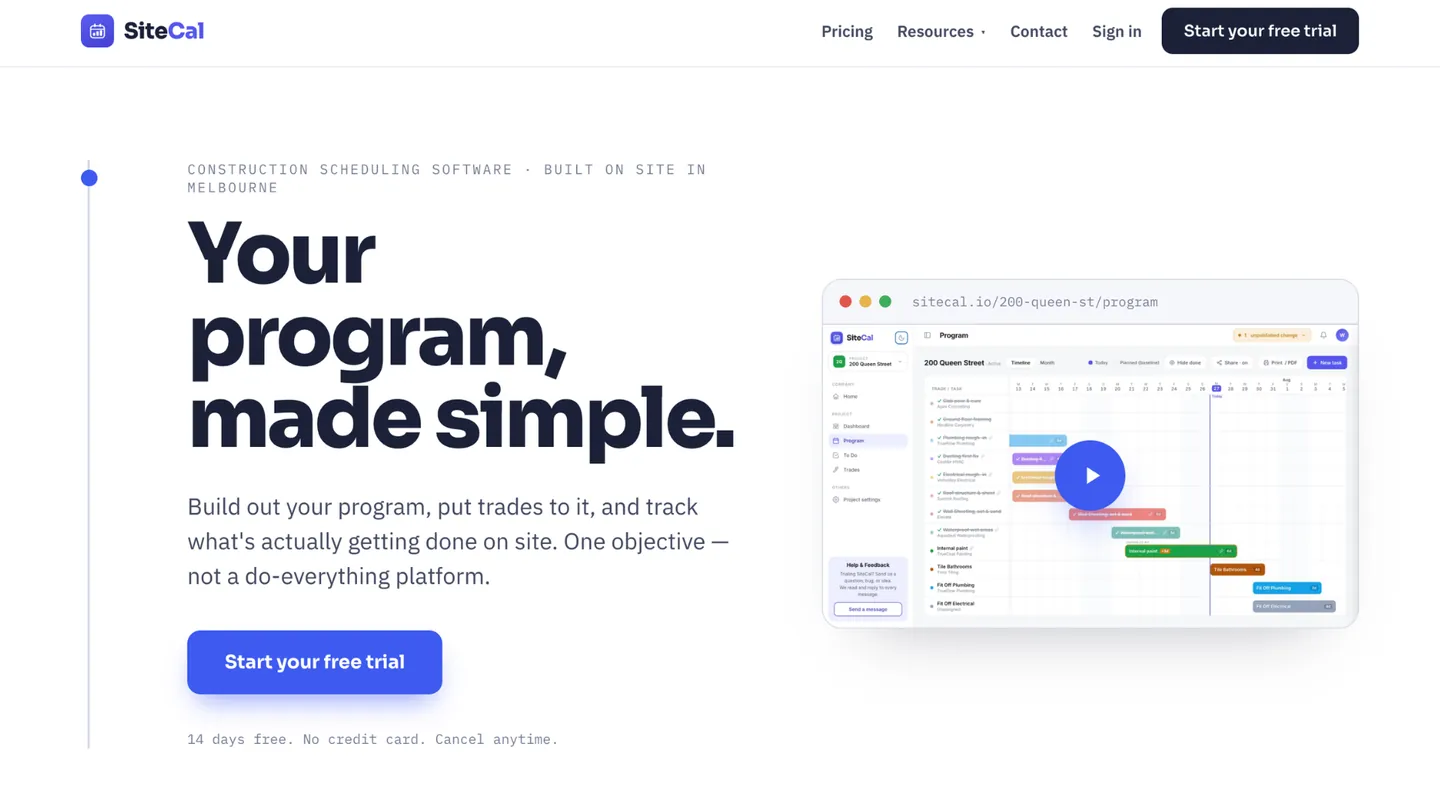
SiteCal is dedicated construction scheduling software built for Australian builders — not a generic project tool repurposed for construction. You build the works program on a calendar-first Gantt, sequence trades (colour-coded), and keep it honest against a baseline.
Why it stands out: the standout is sharing. You send one live, read-only link to every trade — no login, no account, no per-seat cost — so everyone's always on the current program. Move a task and SiteCal offers to shift the whole dependent chain by the same amount (it asks first; it never silently reschedules your job). A locked baseline then shows exactly how many working days ahead or behind you are, with a ghost bar and a slip pill on anything that's drifted.
Key features: working-day Gantt that counts only days on site (with Australian public-holiday calendars and recurring RDOs built in), trade colour-coding and sequencing, planned-vs-actual baseline and slip tracking, offset-preserving cascade, duration-weighted progress, a month-calendar view, a Site Alerts feed, hold-until-publish staged changes, multi-project portfolio with role-based team access, and print/PDF for the trades who still want paper.
Pricing: from $89/mo (Starter) to $199/mo (Pro, unlimited projects), AUD, month-to-month. 14-day free trial, no card. Trades view the live program for free.
Watch-out: SiteCal doesn't do estimating or job costing — pair it with your estimating tool or accounting (Xero, Buildxact, and the like). There's no AI and no cost-impact modelling, and for heavy infrastructure CPM — resource-loaded baselines, forensic delay claims — you'd still want Primavera or Asta.
Who it's for: builders who want the program dialled in and shared, without an ERP or a dedicated planner. (See SiteCal vs Buildxact and vs Wunderbuild if you're weighing it against the AU all-in-ones.)
2. Outbuild — best dedicated scheduler for commercial projects
Best for: larger and commercial teams that want serious, dedicated scheduling with lookaheads.
Outbuild is a purpose-built construction scheduling platform centred on the master schedule and weekly lookahead planning — connecting the overall program to short-term work plans on site, with progress and S-curve tracking. Like SiteCal, scheduling is the whole point; unlike SiteCal, it's aimed at larger and commercial projects.
Key features: proper lookahead planning, master-schedule integration (it reads MS Project and Primavera), multi-project oversight, and collaboration across the project team.
Pricing: quote only — Outbuild routes you to sales rather than publishing prices (third-party listings suggest from around US$999/mo). A free trial is reportedly available.
Watch-out: over-specced (and over-priced) for a small residential crew. For small-to-mid residential builders, SiteCal covers the same job more simply and at a published, lower price.
3. Microsoft Project — best general-purpose CPM
Best for: teams that want a powerful general scheduler and have someone to drive it.
The default scheduler for a generation of planners. MS Project does full critical-path scheduling, dependencies, resource management and baselines — it's powerful and widely understood.
Key features: deep, flexible CPM; near-universal familiarity; reads and writes the file format everyone else integrates with.
Pricing: cloud plans from ~US$10/user/mo (Plan 1, browser-only) to ~US$30 (Plan 3, desktop + scheduling) and ~US$55 (Plan 5, portfolio); the desktop Project Standard/Professional are one-time licences from ~US$680. (Check Microsoft's AU store for AUD.)
Watch-out: it's not construction-specific — nothing in it understands trades, a works program, or an Australian public-holiday calendar out of the box, and the learning curve is steep. It's a planner's tool, not a site tool. (See SiteCal vs Microsoft Project.)
4. Oracle Primavera P6 — best for contract-driven CPM on major projects
Best for: infrastructure, government, mining and major civil contractors with dedicated planners and contractual claims to manage.
Primavera P6 is the CPM benchmark for major capital works and infrastructure, and is mandated on many contract-driven projects where baseline management and delay analysis are required.
Key features: rigorous logic, resource loading, earned-value and portfolio reporting across multi-year programmes; well understood by specialist Australian schedulers and claims consultants.
Pricing: quote/enterprise — Oracle doesn't publish current list prices. Third-party sources cite perpetual licences around US$3,500+/user (plus ~22%/yr support) or cloud subscriptions roughly US$1,300+/user/yr; actual pricing is by reseller and contract.
Watch-out: complex to learn and administer, and not a field tool — it usually needs a separate site-coordination or diary app alongside it. Overkill for anyone outside major civil/infrastructure.
5. Asta Powerproject — best construction CPM without the Primavera overhead
Best for: GCs and specialist trades running medium-to-large projects with in-house planners who want CPM rigour without P6's weight.
Asta Powerproject (Elecosoft) is a construction-focused CPM tool offering serious depth with a gentler learning curve than P6, and visuals site teams can actually read.
Key features: construction-oriented sequencing, quantity-based progress and clear graphical outputs; good import/export for collaborating with clients on other CPM tools; more approachable than Primavera.
Pricing: Elecosoft lists a single-user subscription around £1,470/user/yr (aggregators show a ~US$1,675 starting price); concurrent/SaaS options and an Australian quote come from Elecosoft or a local reseller. Free trial available.
Watch-out: smaller installed base in Australia than P6 (some clients still want P6 files), and it's a scheduler — not a document or jobsite-management platform.
6. Procore — best when scheduling lives inside a full enterprise suite
Best for: Tier-1 and larger Tier-2 contractors who want schedules embedded in one enterprise system and have a PMO to govern them.
Procore is the enterprise construction-management platform many Australian commercial GCs standardise on. Its scheduling sits inside a broader environment — RFIs, drawings, QA, safety and financials — so the program is visible next to everything else.
Key features: tight links between schedule, site diaries, RFIs and change events; unlimited users; a deep integration ecosystem.
Pricing: quote only — Procore prices on your annual construction volume, via an annual contract, with no free trial.
Watch-out: expensive and heavy to implement for a smaller builder, and it's not the deepest CPM authoring engine — larger teams often still run Primavera or MS Project for baselines alongside it.
7. Buildertrend — best for residential builders who live in a client portal
Best for: custom-home builders and renovators who want the schedule and the client experience in one place.
Buildertrend is built for residential builders and renovators working directly with homeowners, combining scheduling with client communication, budgeting and selections in one portal.
Key features: easy calendar/Gantt views for clients and crews; client notifications and approvals tied to schedule milestones; mobile access for dispersed residential jobs; scheduling bundled with job costing and variations.
Pricing: no public pricing — quote-based; third-party estimates put it roughly US$339 (Essential) to ~US$1,099 (Complete) per month. US-origin (used in AU). (If you want an AU-native residential all-in-one instead, see our Wunderbuild review.)
Watch-out: can feel heavy for very small crews that only want a lean scheduler, and it's not geared to formal CPM or civil/infrastructure work.
8. Fieldwire — best for site-level task and short-interval planning
Best for: trades and site crews keeping daily/weekly tasks in sync with a master schedule managed elsewhere.
Fieldwire is a field-coordination and task-management app — foremen turn drawings into tasks with due dates, owners and locations, and run daily/weekly planning without formal scheduling training.
Key features: mobile-first with offline support for remote jobsites; clear links between tasks, plan locations and photos; a genuinely usable free tier.
Pricing: free Basic (5 users, 3 projects); Pro ~US$39/user/mo, Business ~US$59–64, Business Plus ~US$89; Enterprise by quote.
Watch-out: limited CPM depth — not enough as the only schedule on complex, contract-heavy work — and commercial/financial features are light. It's a field-coordination layer, not enterprise project controls.
Honourable mentions
- Touchplan — lean/pull planning for weekly trade commitments (percent-plan-complete analytics); pairs with a master schedule. Quote-based.
- Autodesk Build (Construction Cloud) — scheduling connected to BIM models; strong for BIM-heavy infrastructure and high-rise, heavier to configure. Quote-based.
- Excel / Google Sheets — free and universal, but manual: move one task and you re-drag everything below it, with no baseline and no live version for trades. (See SiteCal vs Excel.)
- Buildxact / Wunderbuild — AU estimating-led all-in-ones with scheduling built in; better if you want estimating and the program in one tool. (See the best Buildxact alternatives.)
How to choose the right construction scheduling software
The "best" tool depends on your project scale, your contract style, and who actually owns the schedule. Three lenses:
1. By project scale
- 5–20 residential/mid-commercial jobs → a builder-first tool like SiteCal (or Buildertrend if you want the client portal).
- Larger commercial portfolios → Procore, Outbuild, or Asta.
- Alliance/PPP infrastructure → Primavera P6 (plus a field tool).
2. By who owns the schedule
- If site supervisors maintain it day-to-day, prioritise speed and simplicity — SiteCal, Fieldwire, Touchplan. Most schedules only stay current when the person updating them can do it in a minute.
- If a dedicated planner owns baselines for claims, you need CPM — Primavera, Asta or MS Project — and a field tool alongside it.
3. By budget and Australian fit
- Watch the real cost: subscription + implementation + training differ sharply between a lean app and an enterprise platform. Check AUD pricing, GST handling where financials are involved, and fit with Xero/MYOB.
- Pilot on one or two live jobs before you standardise — the teams that get value almost always test first and roll out second.
The pattern that works for a lot of AU firms: layer a master schedule (CPM) with a site-level program your trades will actually follow. Primavera or Asta owns the contract baseline; SiteCal or Fieldwire keeps the week-to-week program live on site.
Frequently asked questions
What is the best construction scheduling software in Australia?+
How much does construction scheduling software cost?+
What’s the best construction scheduling software for small or residential builders?+
Do I really need Primavera P6?+
What’s the difference between a master (CPM) schedule and site or lookahead planning?+
The bottom line
Scheduling software earns its keep when foremen and trades actually use it — adoption matters more than feature lists. Match the tool to your projects: Primavera and Asta own infrastructure CPM, Procore dominates enterprise commercial, Buildertrend serves residential, and dedicated schedulers keep the week-to-week program live.
If you're an Australian builder who wants construction-specific scheduling your team will use daily — the works program built, sequenced by trade, tracked against a baseline, and shared with every subbie on one live link — that's exactly what SiteCal is built for.
Keep reading
Go deeper on the comparison, or build the program properly.